Most delay pedals do one basic thing: repeat what you play. The DigiTech TimeBender goes several giant steps beyond that. It can change the rhythm, pitch, direction, tone, modulation, and stereo movement of those repeats, then save the whole setup to one of four memory locations. It can even learn a tempo, musical key, or custom multi-tap pattern simply by listening to the way you strum your guitar.
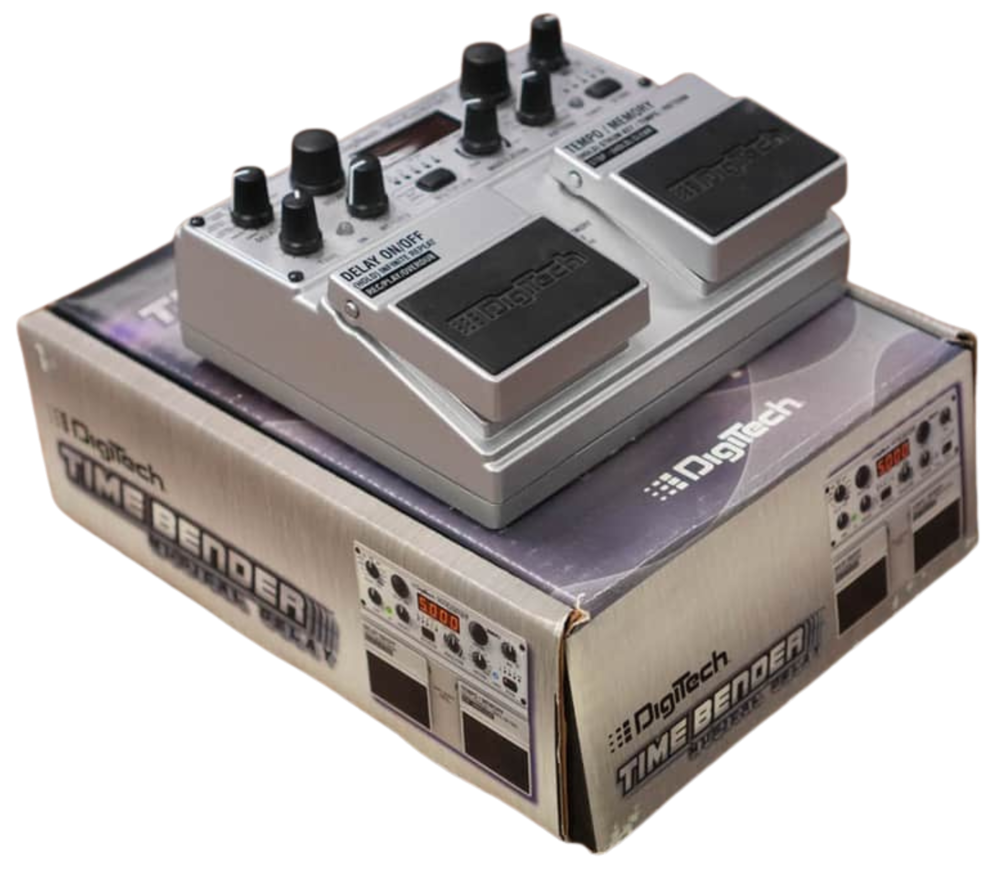
DigiTech introduced the TimeBender Musical Delay at the 2009 Winter NAMM Show. At the time, creating advanced multi-tap patterns and pitch-shifted delay lines normally required racks of processors, layers of menus, and a fair amount of programming. The TimeBender put those capabilities at your feet in the familiar large twin-footswitch enclosure used elsewhere in DigiTech's Specialty line. Most of the important functions had their own knob or button, so you could use it as a straightforward digital, analog, tape, dynamic, or reverse delay one minute, then turn the repeats into intelligent harmonies and musical arpeggios the next.
With all of those controls staring back at you, the TimeBender can look a little intimidating at first. Fortunately, the basic operation is still much like any conventional delay pedal. Pick a Delay Type, set the Delay Time, Repeats, Tone, and Mix, and start playing.
That is only the beginning. Waiting underneath those basic controls are ten delay types, ten built-in repeat patterns plus a custom Strum pattern, up to two pitch-shifted delay voices, five seconds of true stereo delay, expression-pedal morphing, four memory locations, infinite repeats, and a 20-second looper.
Now, let's see why the TimeBender still bends minds =)
Controls:
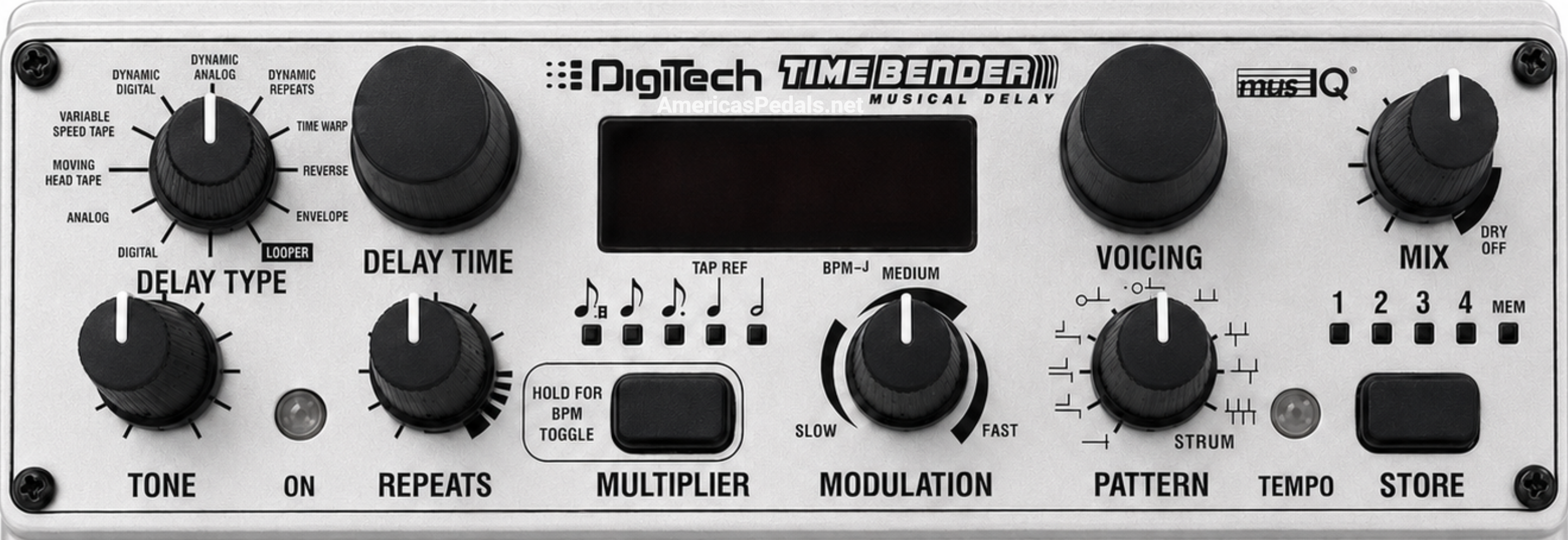
Delay Type: Selects Digital, Analog, Moving Head Tape, Variable Speed Tape, Dynamic Digital, Dynamic Analog, Dynamic Repeats, Time Warp, Reverse, Envelope, or Looper. DigiTech advertised this as ten delay types plus a looper, while the owner's manual counts all eleven selector positions as delay types.
Delay Time: Sets the basic delay time, up to five seconds. The display can show the time in seconds and milliseconds or as beats per minute. Delay Time works with the Multiplier button, so the audible repeat interval may be a multiple or subdivision of the quarter-note reference time.
Display: Normally shows delay time or BPM, but it also identifies the selected Delay Type, Voicing, Pattern, key, and Looper status. During loop recording it counts down the available time, and during playback it becomes a moving progress display.
Voicing: Changes the pitch of the delayed signal. Unison produces a normal delay, while the other choices create one or two scalic, triad-centered, or fixed chromatic voices. Envelope mode also adds eight sets of random voicings. Turning the knob one click displays the current voicing before the next click changes it.
Mix: Controls the level of the delayed signal or Looper playback. The full-clockwise DRY OFF area produces a 100-percent wet signal. With most delay types, the original guitar follows an undigitized analog path and stays at a constant level while Mix adds the repeats. Reverse and Envelope work differently, reducing the dry level as Mix is turned up so a conventional wet/dry balance can be set.
Tone: Darkens the repeats when turned left and brightens them when turned right. Noon leaves the selected delay type's basic voicing intact. The result depends on the Delay Type, which makes the Tone control especially useful for changing the apparent age and condition of the tape-delay sounds.
Repeats: Controls how much signal is returned to the delay lines and therefore how long the repeats continue. Higher settings can move into self-oscillation. In Envelope mode, this knob stops behaving like a feedback control and instead changes the shape of each audio slice from short and percussive through sustained and reverse-envelope shapes.
Pattern: Selects one of ten factory repeat patterns or the custom Strum position. The choices include a simple delay, three dual-delay ratios, four root-based arpeggio patterns, a three-tap pattern, and a six-tap pattern. Stereo patterns can place alternating taps in the left and right channels.
Modulation: Adds chorus-like modulation to any delay type. The knob is divided into Slow, Medium, and Fast ranges, with modulation depth increasing within each range. In Time Warp mode, the modulation becomes a synchronized pitch vibrato with much more extreme movement.
Multiplier Button: Changes the delay rate to half notes, quarter notes, straight eighth notes, triplet eighth notes, or dotted eighth notes relative to the reference tempo. Holding the button switches the display between time and BPM.
Store Button and Memory LEDs: Stores a complete sound in one of four locations. Press Store once, use the right footswitch to choose the destination, then press Store again. The four location LEDs illuminate cumulatively, so Memory 3 is shown with LEDs 1, 2, and 3 lit.
Tempo/Memory Footswitch: The right footswitch either taps tempo or advances through the four memories. Pressing both footswitches together switches between those two jobs. Holding the right footswitch activates Smart Strum, which can read a chord for the key, muted strums for tempo, or a played rhythm for a custom delay pattern.
Delay On/Off Footswitch: Turns the delay effect on and off while allowing existing repeats to fade naturally. Holding it for about one second freezes the active delay line for infinite repeats and stops new guitar notes from entering the feedback loop. In Looper mode, this footswitch controls Record, Play, and Overdub.
Understanding the delay types:
Digital: Clean, full-range repeats with a limiter in the feedback path. When the delay time changes, the old time fades out and the new time fades in without the pitch glide heard in the analog and tape models.
Analog: Based on 1970s bucket-brigade delays, with rolled-off high frequencies and saturation as the feedback level increases. Changing Delay Time makes the echoes slide to the new value and produces the familiar pitch-bending sound.
Moving Head Tape: Models early tube tape systems with movable playback heads. It adds high- and low-frequency roll-off, feedback saturation, and a midrange emphasis. Delay-time changes imitate moving the playback head rather than changing the tape speed.
Variable Speed Tape: Models a tape echo whose delay time is changed by speeding up or slowing down the tape. The resulting pitch glide behaves differently depending on the size and direction of the time change, and larger moves can take noticeably longer to settle.
Dynamic Digital: A clean digital delay with output ducking. The repeats move out of the way while the input is loud, then rise behind the guitar as the played phrase fades.
Dynamic Analog: Uses the same output-ducking idea with the darker, more saturated Analog delay sound.
Dynamic Repeats: Combines Variable Speed Tape with feedback ducking. Loud playing reduces both the audible delay and the signal being fed back, preventing a high-feedback wash from becoming too dense while the guitarist is still playing.
Time Warp: Starts with an analog-style delay, then connects its modulation to the delay time. The available movement can span hundreds of milliseconds, taking the effect from gentle pitch wobble to seasick bends and rhythmic time-smearing.
Reverse: Records the input in sections based on the current delay time and plays each section backward. The TimeBender tries to begin those sections at note onsets, where possible, so fewer notes are split awkwardly across two reversed chunks.
Envelope: Slices the live input into equal sections and plays those slices at the selected pattern times. Repeats changes the envelope shape instead of feedback, and the Voicing control can pitch-shift each slice. With modulation and random voicings, Envelope can move from tremolo and slicer effects to sequenced, pitch-jumping patterns.
Looper: Records, plays, stops, clears, and overdubs a mono loop of up to 20 seconds. The TimeBender analyzes the beginning and end points and adjusts them to help produce a smoother loop. Pitch shifting is available before recording, while Mix, Tone, and Modulation can be changed during playback.
Smart Strum, voicings, and repeat patterns:
Set the key: Select any Pattern other than Strum, hold the right footswitch, and play a clean major or minor chord. The outputs mute while the TimeBender listens, then the display shows the detected key. Scalic and triad-centered voicings use that key to keep the shifted repeats musical.
Set the tempo: Hold the right footswitch and strum fully muted strings at the desired beat. The blue Tempo LED follows the strumming, and the TimeBender stores the resulting quarter-note reference. A repeated clean chord can set the key and tempo together.
Create a custom pattern: Turn Pattern to Strum, hold the right footswitch, and play the rhythm you want. The first strum marks the beginning and as many as six later taps can be placed inside the pattern. The display reports Good when a consistent pattern is accepted or ???? when it cannot identify one.
Scalic voicings: Move the repeats by musical scale tones rather than a fixed number of semitones. The range runs from two octaves down through scale intervals below and above the original note to one octave up.
Triad-centered voicings: Use the L, LL, H, and HH choices to keep the delayed notes centered around the root, third, and fifth of the detected chord. These choices are especially useful with the root-based patterns for building automatically harmonized arpeggios.
Fixed or chromatic voicings: Shift every delayed note by the same number of semitones, regardless of key. The manual lists shifts from 12 semitones down through 24 semitones up.
Factory patterns: P1 is a traditional single delay. P2, P3, and P4 are dual delays using 1/2, 3/4, and 1/3 timing relationships. P5 through P8 are root-based patterns in 2/4, 3/4, 4/4, and swing feels. P9 is a three-tap pattern and P10 is a six-tap pattern.
Connections and signal routing:
Left (Mono) Input: Use this input for the normal mono-in/mono-out setup. With both outputs connected, a mono signal entering the Left input allows multi-tap delays to ping-pong between the left and right channels.
Right Input: Accepts the second channel of a stereo source. For mono-in/stereo-out operation, using the Right input instead of the Left centers most delay patterns rather than ping-ponging them. Dual-delay patterns remain split left and right.
Left and Right Outputs: Use the Left output by itself for mono or both outputs for true stereo delays, ping-pong patterns, stereo modulation, and independent dual-delay lines.
Footswitch Input: Accepts the optional DigiTech FS3X. Its right and center switches move up and down through the four memory locations. In Looper mode, the left FS3X switch provides direct access to overdubbing.
Expression Pedal Input: Accepts a passive mono expression pedal or log-taper volume pedal in the 100 kilohm to 500 kilohm range. It can morph between two complete settings, including Delay Time, Voicing, Mix, Tone, Repeats, Modulation, Multiplier, Pattern, and key.
Power Input: Requires the DigiTech PS0913B family of region-appropriate 9V AC adapters. The TimeBender does not run from a battery and a normal 9V DC pedal supply is not a substitute.
Pricing Breakdown:
Original MSRP (January 2009): $449.95 ($700 today) placed the TimeBender in serious multi-effect territory, but like the similarly priced HarmonyMan, you
got a lot of bang for the buck. The TB2 combined several products' worth of delay, pitch shifting, multi-tap pattern creation, stereo processing, preset storage, and
looping in one heavy-duty pedal.
Documented U.S. Street Pricing: Period pricing is surprisingly inconsistent. Some dealer listings show $299.95, while another preserved listing shows $239.00.
Premier Guitar published a street price of $159 in May 2009, far below the $449.95 list price and the other dealer figures. That price may have been a short promotion,
an early discount, or simply the price available to that reviewer; it should not be treated as the only normal selling price.
Later New-Stock Pricing: Sweetwater's archived product page preserves a final advertised price of $199.95, and later distributor lists marked the TB2 as
clearance stock. The surviving evidence shows that the TimeBender received some very deep discounts, but it does not establish one universal blowout price or one exact
date when every retailer sold through its remaining inventory.
Technical info:
Model Number: TB2 appears in distributor price lists and some international dealer listings. The pedal, manual, and most U.S. advertising identify it simply
as the DigiTech TimeBender Musical Delay. Here at AP, we believe in covering all the bases so it is listed as a TB2 on the site.
Release: Publicly introduced on January 16, 2009, the first day of Winter NAMM. The owner's manual is dated 2009, and the TimeBender appears beside the
HarmonyMan in DigiTech's 2010 Specialty catalog section. It was later discontinued, although the exact final production date has not been conclusively documented.
Delay Types: Ten delay effects plus the Looper position: Digital, Analog, Moving Head Tape, Variable Speed Tape, Dynamic Digital, Dynamic Analog, Dynamic
Repeats, Time Warp, Reverse, Envelope, and Looper.
Delay Time: Up to five seconds of true stereo delay.
Looper: Up to 20 seconds, mono, with Record, Play, Stop, Clear, and Overdub functions.
Patterns: Ten factory patterns plus one user-created Smart Strum pattern with as many as six delay taps after the initial strum.
Voicings: Scalic, triad-centered, and fixed chromatic pitch shifts, plus eight random voicing groups for Envelope mode. One or two shifted voices can be assigned through the selected pattern.
Memories: Four user memory locations. An optional expression pedal adds separate heel and toe values inside a stored sound.
Bypass and Dry Path: When the delay is off, the manual states that the guitar signal is not digitized. Existing repeats spill over and fade naturally instead of being cut off, so this should not be confused with a hard true-bypass switch.
Audio Conversion: 44.1 kHz sample rate with 24-bit processing.
Inputs: Left and Right 1/4-inch mono, unbalanced jacks. Maximum input level is +6 dBu and input impedance is 1 megohm.
Outputs: Left and Right 1/4-inch mono, unbalanced jacks. Nominal output level is +12 dBu and output impedance is 1 kilohm.
External Control: One 1/4-inch TRS FS3X footswitch input and one 1/4-inch TS passive expression-pedal input.
Power: 9V AC at 1.3A from the region-appropriate DigiTech PS0913B adapter. Power consumption is 7 watts. No battery operation.
Dimensions: 6.7 inches wide x 5.6 inches long x 2.6 inches high, according to the owner's manual.
Weight: 2.88 pounds, according to the owner's manual.
Heritage:
The TimeBender followed the HarmonyMan into DigiTech's late-2000s group of large Specialty pedals. Both used a heavy twin-footswitch enclosure, four memories, dedicated displays, and musical pitch intelligence, but they aimed that technology in different directions. The HarmonyMan harmonized the live lead guitar, while the TimeBender applied its voicings to delay repeats and rhythmic patterns.
The TimeBender manual credits musIQ, a trademark of 3dB Research Ltd. That places its chord and key recognition in the same broader technology family DigiTech used in the Vocalist and HarmonyMan products, although the TimeBender's Smart Strum interface was designed around setting a key, tempo, and delay pattern from the guitar itself.
Period reviews naturally compared the TimeBender with established multi-function delays such as the Line 6 DL4 and Boss DD-20. The four memories and built-in looper made that comparison easy, but the pitch-shifted repeats, root-based arpeggio patterns, and guitar-strummed programming were the features that gave the TimeBender its own identity.
DigiTech's 2009 announcement described the TimeBender as a way to bring rack and studio delay tricks to a pedalboard. That statement was not just advertising fluff. Dual delays, six-tap rhythms, stereo placement, intelligent harmony, dynamic ducking, modulation, and expression-controlled morphing really had required several separate devices or much deeper programming before pedals like this appeared.
How players actually use it:
As a normal everyday delay: Select Digital, Analog, or one of the tape types, use P1, leave Voicing at U, and set the familiar Time, Repeats, Tone, and Mix controls. None of the deeper features have to be active.
For dotted-eighth rhythm parts: Tap the song's quarter-note pulse and choose the dotted-eighth Multiplier. The TimeBender calculates the space between repeats without making the player tap the offbeat interval directly.
For harmonized lead echoes: Strum the song's key into Smart Strum, choose a third, fifth, or two-voice combination, and let only the repeats carry the harmony. The dry guitar remains the original melody while the echoes answer it at different pitches.
For automatic arpeggios: Combine a root-based pattern such as P7 with two intelligent voicings. Each cycle begins from the unshifted root note and then moves through the selected harmony voices.
For a custom rhythmic figure: Set Pattern to Strum and play the wanted rhythm into Smart Strum. This is the feature that can turn a guitar part into a tailor-made multi-tap echo without entering individual tap times.
For clear lead playing with a large ambience: Use Dynamic Digital, Dynamic Analog, or Dynamic Repeats. The delay stays behind the picked notes and rises into the gaps instead of washing over every phrase.
For sound design: Time Warp, Reverse, and Envelope respond dramatically to Pattern, Voicing, and Modulation changes. An expression pedal can morph several parameters together, making the TimeBender behave more like an instrument than an ordinary delay.
As a bass-and-guitar looper: Select Looper and an octave-down 8L voicing to record a bass line, then return Voicing to unison and play normal guitar over it. An expression pedal can place the octave-down and unison sounds at opposite ends of its travel.
Suggested starting settings:
Basic digital delay: Digital, 0.500 seconds, P1, Voicing U, quarter-note Multiplier, Repeats around 9 o'clock, Tone at noon, Mix at noon, and Modulation off. This is essentially the owner's manual starting point.
Dotted-eighth rhythm: Digital or Analog, P1, Voicing U, dotted-eighth Multiplier, Repeats around 9 to 10 o'clock, Mix around 10 o'clock, and Tone to taste. Tap the quarter-note pulse with the right footswitch.
Warm tape wash: Variable Speed Tape, 0.650 to 0.800 seconds, P1, Voicing U, Repeats around 1 o'clock, Tone around 10 o'clock, Mix around 10 to 11 o'clock, and a small amount of Slow modulation.
Ducked lead delay: Dynamic Digital, 0.400 to 0.500 seconds, P1, Voicing U, Repeats around 11 o'clock, Tone at noon, and Mix around 11 o'clock. Pick firmly, then let the last note ring so the repeats rise behind it.
Intelligent arpeggio: Set the correct key with Smart Strum, choose P7, select 3H and 5H as the two voices, set the delay near 0.600 seconds, keep Repeats around 10 to 11 o'clock, and begin with Mix around 9 to 10 o'clock.
Wide stereo multi-tap: Connect both outputs, choose P10, set both voices to unison, use 0.800 to 1.200 seconds as the reference time, keep Repeats low, and add Slow modulation. The six taps alternate across the stereo field.
Envelope slicer: Envelope, P10, unison or one of the random voicing sets, Delay Time synchronized to the song, Mix near noon, and Repeats adjusted while playing to find the wanted slice shape. A sustained distorted chord gives Envelope more material to cut into a rhythm.
Collector notes:
The original package included the TimeBender, the region-appropriate PS0913B power supply, owner's manual, registration card, and retail box. The correct adapter is essential because this pedal requires 9V AC at up to 1.3A and cannot be properly tested with the common 9V DC supply used by most stompboxes.
Check the four-character display for complete segments, the blue Tempo LED, all four Memory Location LEDs, the Memory mode indicator, the Multiplier indicators, and the multi-color On LED. A cosmetically clean example can still have a display or switch problem that is easy to miss in a seller's photographs.
Test both inputs and both outputs. The Left input is commonly used for mono, so a seller may never have checked the Right input or the stereo panning. Also test the FS3X and expression jacks if the right accessories are available.
The 2010 DigiTech catalog and the original January 2009 announcement both advertise a 23-second looper. The final owner's manual specifies and describes a 20-second mono looper. Until production documentation proves otherwise, the owner's manual is the safer operating specification and the 23-second figure should be treated as an early marketing claim or documentation carryover.
Period advertising says the TimeBender has ten delay types, while the owner's manual says eleven. The difference is simply the way the Looper is counted: ten actual delay effects appear on the selector along with an eleventh Looper position.
The tape terminology also varies in period material. The pedal and detailed manual section use Moving Head Tape and Variable Speed Tape, while some feature lists and advertising say Fixed Head Tape. Known pedals do not show a separate Fixed Head selector, so this appears to be a naming inconsistency rather than a different production version.
The TimeBender shares its 6.7 x 5.6 x 2.6-inch, 2.88-pound enclosure dimensions with the HarmonyMan. Corner chips, scuffs around the footswitches, worn rear-panel lettering, missing knob caps, and damaged adapter cables are the most obvious things to look for on a well-used example.
The TimeBender has developed a reputation as one of DigiTech's overlooked specialty pedals. Its current value can move sharply depending on condition, completeness, and whether the original power supply is present. A recent asking price is not the same thing as a confirmed sale, so collector value should be judged from completed transactions whenever possible.
Known quirks and tips:
Use the correct power supply: The TimeBender requires 9V AC, not 9V DC. The original region-specific adapter is from the DigiTech PS0913B family and is rated at 1.3A. Never assume that a plug fitting the power jack makes a supply electrically compatible.
Recalled memories can ignore the knob positions: When a memory is active, the sound comes from its stored values even though the physical knobs have not moved. Step through the memories until no Memory Location LED is lit to hear the settings shown on the panel.
The right footswitch has two personalities: It cannot tap tempo and advance memories at the same time. Press both footswitches together to switch its job, then watch the Memory Indicator LED to confirm which mode is active.
Smart Strum mutes the outputs: Key, tempo, and custom-pattern entry are intended as setup operations. The guitar does not pass through the outputs while the TimeBender is listening to the strums.
Use a clean signal for recognition: Strong distortion, hum, and noise can be mistaken for notes and may cause the detected key to change. For tempo entry, fully mute the strings and turn off noisy effects ahead of the pedal.
The display and Tempo LED can appear to disagree: The blue LED always marks the quarter-note reference. If another Multiplier is selected, the audible delay time and the seconds display can differ from that blink rate by design.
High Repeats settings can run away: Analog, tape, and other feedback-based sounds can build in volume and saturation. If a recalled preset suddenly grows louder, leave memory mode and turn Repeats down before troubleshooting anything else.
Delay tails continue after bypass: Turning the delay off stops new notes from entering the effect while existing repeats fade away. This spillover is useful musically, but players expecting the repeats to stop instantly need to plan around it.
Infinite Repeat is not the same as Looper: Holding the left footswitch freezes the current delay contents, turns the On LED yellow, and lets you play over them without adding new notes. Step on the switch again to return to normal delay operation.
The Looper is mono: Stereo inputs are summed and the loop is played back in mono. Selecting the Looper also clears the existing loop memory, and loops are not stored when power is removed.
Expression presets remember two sounds: A stored memory can contain different heel and toe values. If that memory is loaded without an expression pedal connected, the TimeBender uses the stored toe-position sound.
Connect the FS3X with the power off: The owner's manual specifically instructs users to connect or disconnect the optional FS3X only while the TimeBender is turned off.
Factory reset erases all four memories: Hold Store for three seconds until the display reads FAC, then hold Store again to confirm. Press the left footswitch or Multiplier button instead if you entered the procedure accidentally and want to cancel.
Hear the DigiTech TimeBender Musical Delay in action:
I usually just point people to YouTube and let them explore on their own. This time, I'm recommending this video first. Leon Todd, IMO does the best TimeBender demo out there. It's 27 minutes long and worth every second.