DigiTech HM2 HarmonyMan Intelligent Pitch Shifter
Home > DigiTech Specialty Pedal Index > DigiTech HarmonyMan Intelligent Pitch Shifter

Guitar harmonies sound simple until one guitarist has to create all of them at the same time. A regular pitch shifter can move every note by the same interval, but the result will not always stay inside the song's key. The DigiTech HarmonyMan was designed to handle the musical decisions as well as the pitch shifting. It listens to the chords you play, works out a useful key and scale, and then adds one or two harmony voices to your lead line.
DigiTech first showed the HarmonyMan at Frankfurt Musikmesse, held March 12 - 15, 2008, and formally announced it for May 2008 availability. It was demonstrated again at Summer NAMM in Nashville, June 20 - 22, 2008. From the beginning, the HarmonyMan stood out as one of DigiTech's most ambitious stand-alone pedals. Its two harmony voices could be selected independently, the original guitar could remain in the mix, and four complete setups could be stored for footswitch recall. DigiTech also gave it a Circle of Fifths key display, a built-in tuner, a pre-harmony distortion loop, stereo outputs, and a Sidechain input that allowed a second guitarist or prerecorded rhythm track to guide the harmonies.
The HarmonyMan does take a little time to understand. Once its signal routing and four shifting modes make sense, however, it becomes much more practical than the crowded control panel first suggests. It can cover the familiar twin-guitar sound, three-part lead lines, fixed octave effects, detune and chorus textures, and some very creative stereo sounds. DigiTech placed it in the Specialty section of its 2009 and 2010 catalogs, which feels like exactly the right home for it.
Now, let's discover why =)
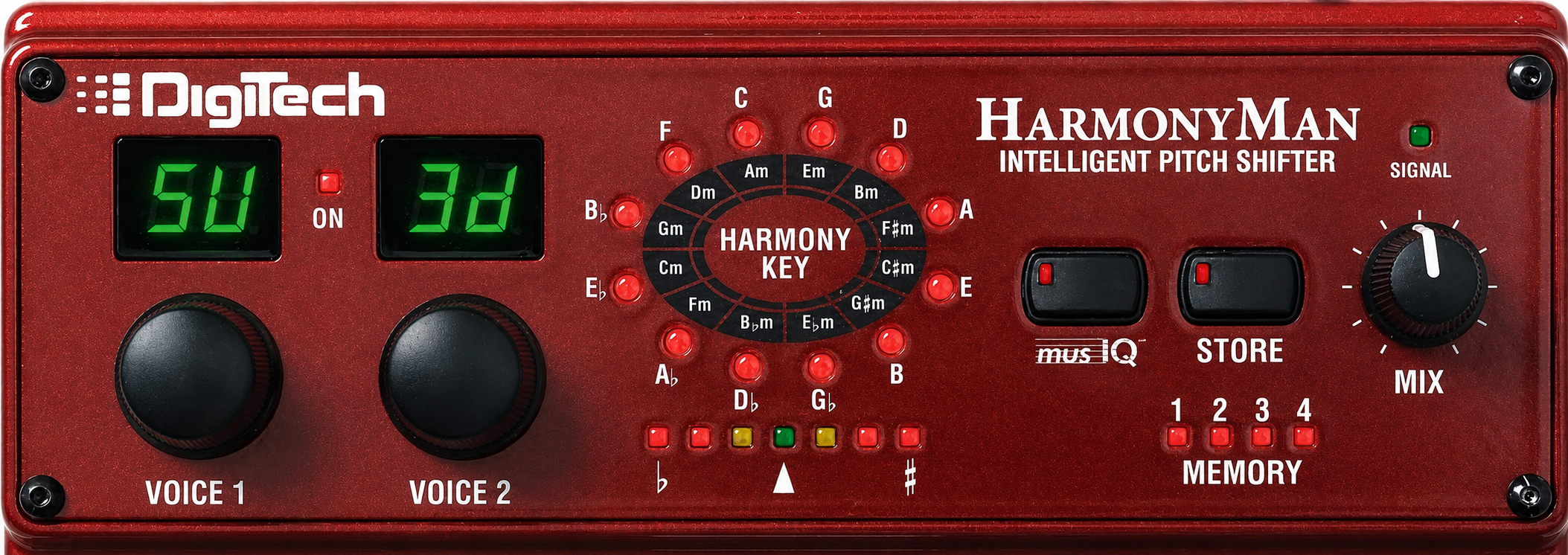
Controls:
- Harmony Key Display: The ring of red, yellow, and green LEDs is arranged like a Circle of Fifths. It shows the key and scale being used by the intelligent harmony modes. A circling red light means the pedal is still waiting for enough musical information. Yellow means it has selected a key but is not completely certain, and green means it has settled on a key with greater confidence.
- musIQ™ Button: Turns DigiTech's automatic chord and key recognition on or off. With one guitar connected, musIQ listens while the harmony effect is bypassed and uses the recently played chords to choose a key and scale. With musIQ turned off, the HarmonyMan uses the manually stored key instead.
- Memory Store Button: Stores the two Voice settings, Mix setting, and manual harmony key in the active memory location. The button lights when a control has been changed but the new setting has not yet been saved.
- Signal LED: Shows the level at the Clean Guitar Input. Green is the normal operating range, yellow means the signal is approaching clipping, and red means it is too hot. A red indication is especially important here because an overloaded input can make note and chord recognition less accurate.
- Mix: Balances the dry lead guitar against the generated harmony voices. Full counter-clockwise gives only the lead guitar, while full clockwise gives only the harmonies. The Mix setting is saved as part of each memory.
- Voice 1 and Voice 2: These two rotary selectors choose the interval or shifting mode for each generated harmony voice. Either voice can be turned off, used alone, or combined with the other voice. The small displays above the knobs show the selected abbreviations. Voice 1 also becomes the note display for the tuner.

- Memory Select Footswitch: Steps through the four memory locations. Pressing and holding this footswitch while strumming a chord manually sets the key and scale. Pressing and holding it without strumming clears the recent musIQ information so the pedal can begin listening fresh for the next song.
- Harmony On/Off Footswitch: Turns the harmony effect on and off. The bypass is true analog bypass. Holding the switch engages the built-in tuner; the output is muted while tuning.

Understanding the four shifting modes:
- Triad-Centered Shifting: Builds harmony lines around the root, third, and fifth of a chord and their inversions. The uppercase LL, L, H, and HH choices favor major tonality, while the lowercase ll, l, h, and hh choices favor minor tonality. These are the settings that most clearly show what made the HarmonyMan unusual. When a rhythm signal is connected to the Sidechain input, the triad-centered voices can respond to the chord progression in real time.
- Scalic Shifting: Keeps the harmony notes inside the selected key rather than applying one fixed semitone interval. Choices include two octaves down (2o), one octave down (8L), scale tones 6L through 3L below, scale tones 3H through 6H above, and one octave up (8H). A 3H setting may move a played note by three semitones in one part of the scale and four semitones in another so the harmony remains musical.
- Fixed or Chromatic Shifting: Moves every input note by the same number of semitones, regardless of key. The available settings run from -12 through -1 and +1 through +12. This is the familiar pitch-shifter side of the pedal and is useful for fixed intervals, octave sounds, and less traditional combinations.
- Detune Shifting: Adds a very small pitch offset for a thicker, chorus-like sound. The four choices are d1 at 5 cents, d2 at 10 cents, d3 at 20 cents, and d4 at 30 cents. Voice 1 detunes upward and Voice 2 detunes downward, so using the same detune setting on both voices creates a wide three-part spread around the dry guitar. Unlike the intelligent and fixed modes, the detune voices are designed to work well with full chords.

Connections and signal routing:
- Guitar Clean Input: The HarmonyMan needs a clean, unprocessed guitar signal here so it can recognize notes, chords, keys, and scales accurately. If nothing is plugged into the Distortion Return, this is also the signal that is pitch shifted.
- Distortion Send and Return: This loop solves one of the biggest practical problems with intelligent harmonizers. The clean input remains available for accurate recognition, while an overdrive or distortion pedal can be inserted before the harmony generation. The returned distorted signal is the one that receives the added harmony voices.
- Sidechain Input and Thru: A second rhythm guitar, or a prerecorded accompaniment such as a DigiTech JamMan loop, can become the chord-recognition source. The lead guitar connected to the Clean Input is still the instrument being harmonized. The Thru jack passes the rhythm signal onward to its own amplifier, and the Ground Lift switch is provided to help control hum in a two-guitar, two-amp setup.
- Left and Right Main Outputs: Use the Left output by itself for mono. With both outputs connected, the harmony voices are hard-panned left and right while the dry lead remains in the center. The stereo arrangement can make a three-part setting sound much larger than the same preset through one amplifier.

Pricing Breakdown:
- Original MSRP (2008): $449.95. At almost $700 in 2026 dollars, that was a serious chunk of change for a pedal, but you got a lot of bang for the buck! The HarmonyMan used musIQ technology to listen to the chords you were playing, figure out the key, and add one or two independently controlled harmony voices to your lead. You also got a Sidechain input, a distortion loop, four memory locations, and the correct power supply right in the box.
- Typical U.S. Street Price (2008 - 2011): $299.95. Even at a 33% discount from the MSRP, it still hit the wallet hard for casual players who looked at multi-part harmonization as a luxury effect rather than a board staple. Still, it sold pretty well for a specialty pedal at that price point.
- Blowout Price (approximately 2011 - 2013): $199.95, with some reports as low as $149.99. As the HarmonyMan reached the end of the line, retailers began cutting the usual $299.95 street price. The blowout price I have been able to document most often is $199.95, although some reports claim that brand-new, factory-sealed pedals were cleared out for as little as $149.99. That rock-bottom price appears to have been a short-lived deal offered by individual retailers while they still had stock. By 2014, the HarmonyMan was widely being described as discontinued.

Technical info:
- Model Number: HM2. The commonly published UPC is 691991201356.
- Release: Announced for May 2008. The HarmonyMan appears in DigiTech's 2009 and 2010 Specialty catalog sections and was later discontinued.
- Harmony Voices: Up to two generated voices plus the original lead guitar for three-part guitar harmony. DigiTech advertised 42 selectable voices and four styles of shifting: Triad-Centered, Scalic, Fixed/Chromatic, and Detune.
- Memories: Four user memory locations. Each stores Voice 1, Voice 2, Mix, and the manual key and scale.
- Bypass: True analog bypass when the harmony effect is off.
- Audio Conversion: 44.1 kHz sample rate with 24-bit processing.
- Clean Guitar Input: 1/4-inch mono, +11 dBu maximum input level, 1 megohm input impedance.
- Distortion Send: 1/4-inch mono, unity-gain buffered output of the Clean Guitar Input.
- Distortion Return: 1/4-inch mono, +11 dBu maximum input level, 1 megohm input impedance.
- Sidechain Input: 1/4-inch mono, +11 dBu maximum input level, 1 megohm input impedance.
- Sidechain Thru: 1/4-inch mono, hardwired from the Sidechain Input.
- Main Outputs: Left and Right 1/4-inch mono jacks, +16.7 dBu maximum output level, 1 kilohm output impedance.
- Power: 9V AC from the included DigiTech PS0913B adapter, which is rated for a maximum output of 1.3A. The barrel plug is 9.5mm long and 5.5mm wide with a 2.5mm center pin. Power consumption is 7 watts. The HarmonyMan does not operate from a battery.
- Dimensions: 6.7 inches wide x 5.6 inches long x 2.6 inches high, according to the owner's manual.
- Weight: 2.88 pounds, according to the owner's manual.

Heritage:
- DigiTech had been developing intelligent pitch-shifting equipment since the 1980s, but many earlier systems expected the player to understand keys, scales, or MIDI control. The HarmonyMan was part of the company's effort to put that processing into a pedal that could learn from ordinary guitar chords.
- The HarmonyMan's musIQ technology came from the DigiTech Vocalist family, where a guitar accompaniment was used to generate vocal harmonies. For the HarmonyMan, DigiTech applied the same general chord-recognition idea to the guitar signal itself. The musIQ name was a trademark of 3dB Research Ltd.
- The red twin-footswitch enclosure also places the HarmonyMan beside the JamMan and the later TimeBender in a visually related group of large DigiTech pedals. DigiTech gathered all three, along with the Whammy family, under the Specialty heading in its catalogs without giving them a shared numbered-series name.
- Period reviews identified the HarmonyMan as U.S.-made and praised its heavy cast-metal construction. That substantial enclosure, along with the dedicated displays and extensive rear-panel routing, helps explain why the HarmonyMan still feels more like a compact processor than a typical two-knob pitch pedal.
(Click to enlarge)

How players actually use it:
- For a learned song progression: Leave the harmony off, turn musIQ on, and play the rhythm chords before the solo. Once the key display settles, step on the Harmony footswitch and play the lead. The key locks when the harmony is engaged so the solo itself does not confuse the recognition system.
- For a song that begins with a solo: Hold the Memory Select footswitch and strum the song's opening chord before starting. This manually sets the key and scale without reaching down to the pedal. The output mutes during the Strum Key operation.
- For classic twin-guitar leads: Use one scalic voice, usually a third above or below, and keep enough dry guitar in the Mix to preserve the original melody. This is the quickest route to the familiar Allman Brothers, Thin Lizzy, Iron Maiden, or Brian May type of layered lead sound.
- For a three-guitar stack: Add a second voice, often a fifth or sixth in the opposite direction. Lowering the Mix usually helps the generated parts sit behind the original note instead of swallowing it.
- With a rhythm guitarist or loop: Feed the rhythm part to the Sidechain Input and let it follow the progression while the lead player solos. Full chords played in a steady rhythm give the recognition engine its best information. Triad-Centered voicings make the most of this setup because they can respond directly to the changing chord structure.
- As a fixed pitch shifter: Turn musIQ off and use the chromatic semitone settings for intervals that should not change with the key. Octave doubling, unusual dissonances, and effect-only lines are all available without asking the pedal to analyze a progression.
- As a chorus or thickener: Select the same d1 or d2 detune setting on both voices and keep the dry guitar in the mix. Voice 1 moves slightly sharp and Voice 2 slightly flat, creating a broad three-part image that also works with chords.
- In stereo: Connect both Main Outputs to two amplifiers or mixer channels. The separate harmony voices spread left and right while the lead stays centered, making even a modest one-voice setting sound much wider.

Suggested starting settings:
- Simple third above: Voice 1 at 3H, Voice 2 at OF, Mix around 10 to 11 o'clock, and musIQ on. Play the song's chord progression with the effect off before engaging the harmony.
- Three-part major lead: Voice 1 at H and Voice 2 at HH in Triad-Centered mode, Mix around 9 to 10 o'clock, and musIQ on. Use the uppercase settings for a major-key starting point and let the chord progression guide the result.
- Third and fifth stack: Voice 1 at 3H, Voice 2 at 5H, Mix around 9 o'clock, and the correct key set automatically or manually. Two generated voices add up quickly, so begin with less effect than you think you need.
- Octave-down support: Voice 1 at 8L, Voice 2 at OF, Mix around 9 to 10 o'clock. This can add weight beneath single-note lines without turning the pedal into a full three-part arrangement.
- Wide detune: Set both voices to d2 for a useful 10-cent spread, keep the Mix around 10 o'clock, and try both outputs in stereo. Move to d1 for subtle thickening or d3 and d4 for a more obvious effect.
- Effect-only harmony line: Choose one or two voices and turn the Mix fully clockwise. This removes the dry guitar and exposes only the shifted parts, opening the door to strange voicings and processed backing parts.

Collector notes:
- The original package included the HarmonyMan, the region-appropriate PS0913B power supply, owner's manual, warranty or registration card, and retail box. The power supply matters more than the usual box candy because the pedal requires 9V AC at 1.3A and cannot be tested properly with a common 9V DC adapter.
- Clean examples often show wear on the corners, footswitch pads, and rear-panel lettering. Check that both two-character Voice displays have complete segments, that every Harmony Key LED works, and that the Memory Select switch advances through all four locations.
- Test every rear-panel jack if possible. A seller may have used only the Clean Input and Left Output, leaving problems in the Distortion Return, Sidechain, Thru, or Right Output unnoticed.
- The owner's manual lists the enclosure at 6.7 x 5.6 x 2.6 inches and 2.88 pounds. Some period dealer listings published much larger 9.75 x 7.9 x 3.4-inch and 4-pound figures. The manual is the better source for the pedal itself; the larger numbers may have been copied from packaged-product data.
- DigiTech's period product sheet repeatedly advertised 42 selectable voices. The individual settings shown in the owner's manual's four mode tables do not reconcile neatly with that number. This appears to be a documentation inconsistency rather than a difference between known production versions.
- The HarmonyMan is discontinued, specialized, and expensive to replace with an exact equivalent. That combination gives it collector interest, but it has not settled into one consistent price range. Completeness, display condition, and the correct power supply can matter as much as cosmetic condition.

Known quirks and tips:
- Use the correct power supply: The HarmonyMan is specified for the PS0913B, a 9V AC adapter rated at 1.3A maximum. A normal center-negative 9V DC pedal supply is not a substitute. Confirm the AC output and 2.5mm center-pin plug before powering a used example.
- Give it a clean signal: Pitch and chord recognition work best when the Clean Guitar Input sees the guitar before distortion, modulation, delay, or reverb. If you want dirt before the harmony, place the dirt pedal in the HarmonyMan's Distortion Send and Return loop.
- Watch the Signal LED: Occasional yellow is a warning that you are close to the limit. Repeated red means the input is clipping, and the owner's manual specifically notes that this can degrade note detection.
- One chord may not be enough: musIQ generally makes a better decision after hearing a short chord progression. If it carries information from the previous song, hold and release the Memory Select footswitch without strumming to clear its memory before you begin.
- The key locks in single-guitar use: With no Sidechain connected, automatic key tracking happens while the harmony is off. As soon as the effect is engaged, the current key is locked so the lead line cannot accidentally make the pedal choose a new key.
- Sidechain behavior is different: When a Sidechain signal is present, the display and chord analysis can continue reacting while the harmony is on. A green LED shows the current key and a yellow LED shows the detected chord. Full, steady rhythm-guitar chords work better than sparse or heavily processed accompaniment.
- The displayed key can surprise you: musIQ chooses the setting it believes will produce the best harmony, which may not match the key name a player would use for the song. Modal music is a common reason. If the result sounds wrong, manually set another key rather than trusting the label alone.
- Play clean single-note lines: Triad-Centered, Scalic, and Fixed modes are optimized for single-note guitar soloing. Loose double-stops, open strings, and notes ringing across one another can make any intelligent shifter sound less certain. Detune mode is the exception and is designed to accept chords.
- Four memories require planning: The Memory Select footswitch only moves forward through locations 1 to 4. Arrange presets in performance order when possible, and remember that an automatic musIQ key can override the manual key stored with a preset.
- Check the stereo balance: In stereo, the generated voices are hard-panned while the dry lead is centered. A one-voice preset can therefore feel lopsided. Using two complementary voices or adjusting the receiving channels can produce a more balanced spread.
- Effects-loop levels matter: The owner's manual shows an amplifier send/return setup and recommends a -10 dB loop level. Hotter line-level loops may overload the pedal even when the guitar itself is not especially loud.

Hear the DigiTech HarmonyMan Intelligent Pitch Shifter in action:
External Links:
Home  America's Pedal
FX-Series
X-Series
D-Series
Artist Series
Performer Series
Hardwire Series
Specialty Pedals
New Releases
Field Guide
Serial Number info
FX literature
What's New?
FX Tech info
Links
Disclaimer/Legal/Contact Us
America's Pedal
FX-Series
X-Series
D-Series
Artist Series
Performer Series
Hardwire Series
Specialty Pedals
New Releases
Field Guide
Serial Number info
FX literature
What's New?
FX Tech info
Links
Disclaimer/Legal/Contact Us
|